contact@ffxf.net
 Console

For a GitHub Actions workflow to create a machine, restart it or destroy it, it has to authenticate to the API. Until now that meant an API key kept in the repository's secrets: a value that lives for months, that anyone able to edit a workflow can get out, and that someone must remember to replace when a person leaves the team.
The FFxF API now accepts OIDC tokens. GitHub Actions, GitLab CI and other OIDC issuers sign, for each job, a token that lasts a few minutes and says where the job comes from: which repository, which branch, which workflow. You tell FFxF which tokens to accept and with which rights; the repository holds no secret anymore. This article walks through the whole setup, with real output from a demonstration.
1. What changes
- With a key, the API knows who you are, not who is calling. A copy of the key works just as well from a stranger's laptop.
- With OIDC, every call carries an identity signed by GitHub:
repo:acme/app:ref:refs/heads/main, this workflow file, this trigger. FFxF checks the signature, then compares those facts with your rules. - The token expires after five minutes. Found in a log the next day, it is worthless.
2. Declare GitHub as a provider
In the console, under Account → OIDC, add a provider named
"GitHub Actions" with the issuer
https://token.actions.githubusercontent.com. FFxF gives it an
audience unique to your account, of the form
ffxf-oidc-…: the value your workflows will request their tokens
for.
That audience is what ties a token to your account. GitHub issues tokens to any repository for any audience it asks; a token requested for another value than yours is refused before its signature is even checked.
3. A binding: which tokens, which rights
A binding brings together conditions on the token's content and the scopes it
grants, the same as for API keys. For a deployment from the main
branch, with a single workflow file allowed:
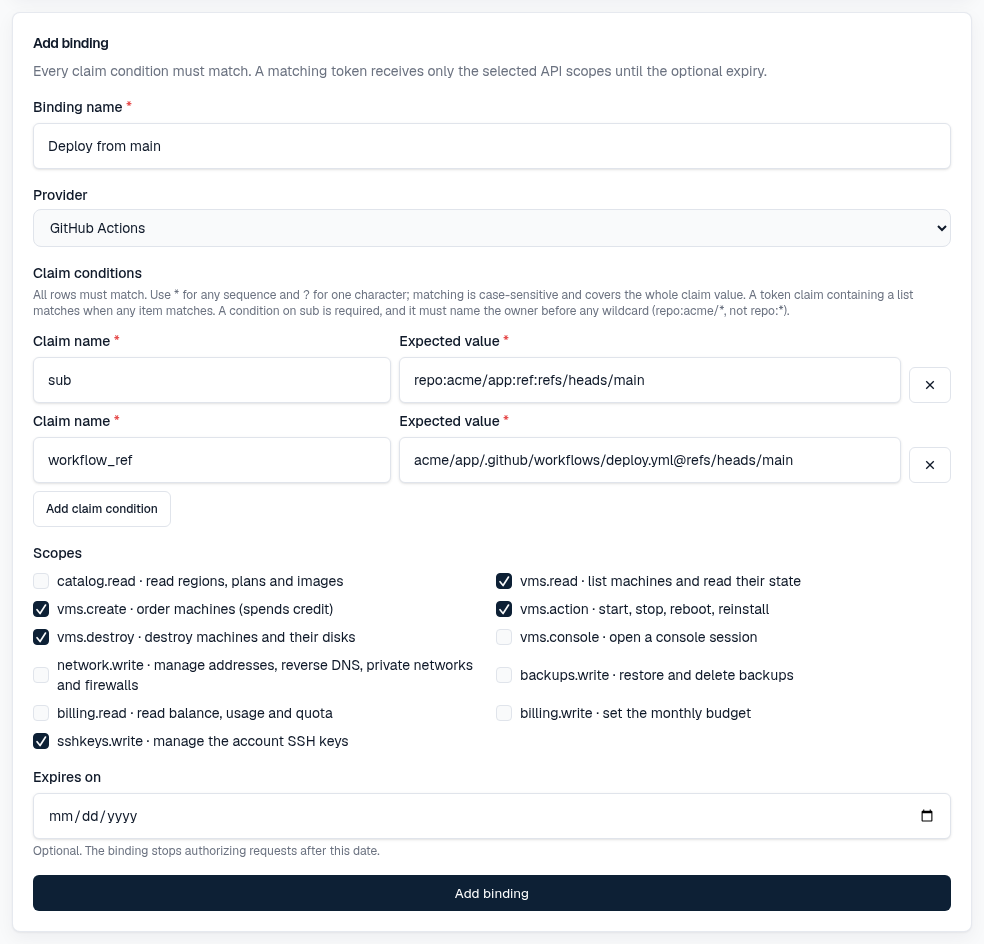
sub=repo:acme/app:ref:refs/heads/main: the repository and the branch.workflow_ref=acme/app/.github/workflows/deploy.yml@refs/heads/main: the workflow file. Another workflow of the same repository, even onmain, gets nothing.- The scopes: read, create, act on and destroy machines, manage SSH keys. Nothing on billing.
Wildcards are allowed (* for any sequence of characters,
? for one), with a guard: in sub, the repository owner
must be named before any wildcard. repo:acme/* accepts every
repository of acme; repo:* would accept every repository
on GitHub, and the console refuses it.
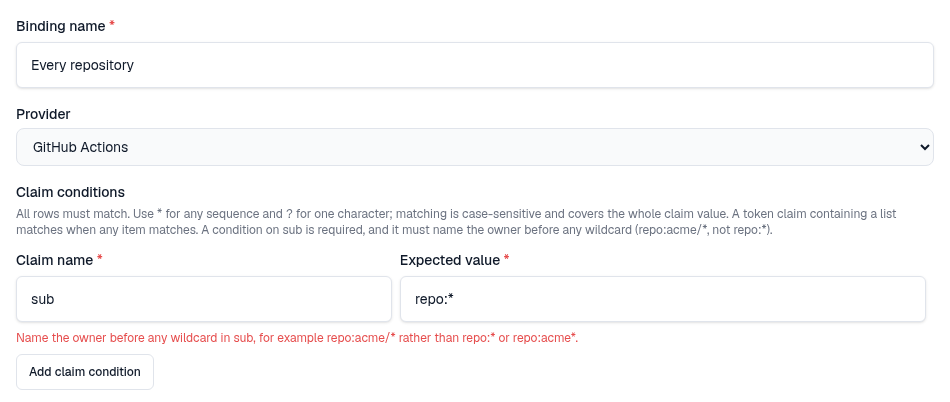
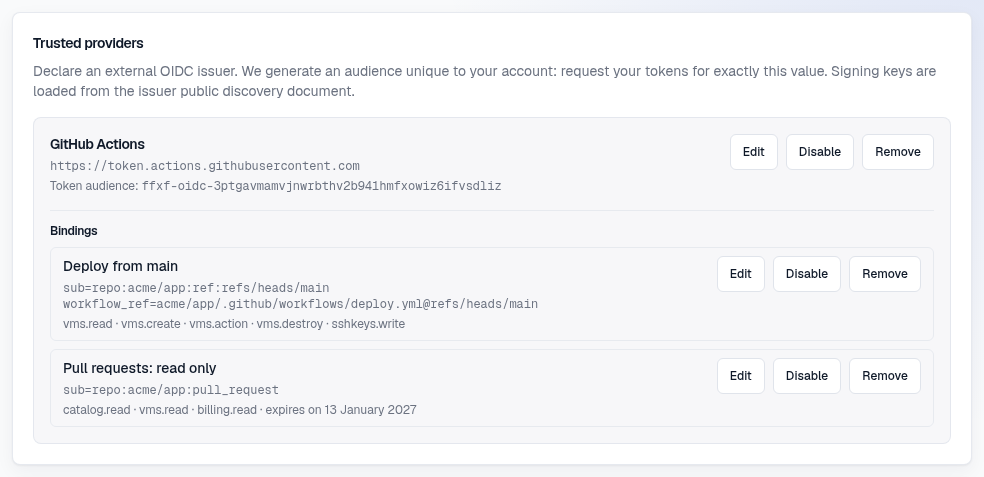
The refusal also covers repo:acme*, without a slash: that pattern
would let the acme-evil account in. A second binding, read-only and
with an expiry date, serves pull requests:
4. The workflow
The job needs the id-token: write permission. It requests a token
from GitHub for your audience, masks it in the log, then uses it like a key:
permissions:
  contents: read
  id-token: write

jobs:
  deploy:
    runs-on: ubuntu-latest
    env:
      FFXF_API: https://api.ffxf.net/v1
      FFXF_OIDC_AUDIENCE: ffxf-oidc-…   # copied from the console
    steps:
      - name: FFxF token
        run: |
          token=$(curl -sS -H "Authorization: Bearer $ACTIONS_ID_TOKEN_REQUEST_TOKEN" \
            "$ACTIONS_ID_TOKEN_REQUEST_URL&audience=$FFXF_OIDC_AUDIENCE" | jq -r .value)
          echo "::add-mask::$token"
          echo "FFXF_TOKEN=$token" >> "$GITHUB_ENV"

      - name: List machines
        run: curl -sS "$FFXF_API/vms" -H "Authorization: Bearer $FFXF_TOKEN"
No secret in the repository settings: the audience is not one, since it cannot
authenticate on its own. On GitLab CI it is shorter still: an
id_tokens block with aud: ffxf-oidc-… puts the token in
a variable.
5. The demonstration
We ran a workflow like this one against our test environment, which runs the same authentication code as the public API. The output below is real; only the repository name and the audience are shortened. First, what the token issued by GitHub contains:
{
  "iss": "https://token.actions.githubusercontent.com",
  "aud": "ffxf-oidc-z8ma…",
  "sub": "repo:acme/app:ref:refs/heads/demo-oidc",
  "ref": "refs/heads/demo-oidc",
  "workflow_ref": "acme/app/.github/workflows/oidc-demo.yml@refs/heads/demo-oidc",
  "event_name": "push",
  "lifetime_s": 300
}
Five minutes of validity. The demonstration binding granted
billing.read and vms.read to that branch and that file.
Both reads go through:
GET /v1/account   → HTTP 200   {"currency":"CAD","billing_mode":"prepaid"}
GET /v1/vms       → HTTP 200
Setting the monthly budget needs billing.write, which the binding lacks:
PUT /v1/account/budget → HTTP 403
{"code":"insufficient_scope",
 "message":"The OIDC binding is missing the scope required for this call.",
 "details":{"required":["billing.write"]}}
The same workflow pushed to another branch, demo-oidc-autre, gets a
token just as valid, but no binding accepts it:
GET /v1/account → HTTP 403
{"code":"oidc_claim_mismatch","message":"The token does not match an enabled OIDC binding."}
Finally, a token requested from GitHub for another audience than the account's is refused at once, without any call going out to GitHub to check its signature:
GET /v1/account → HTTP 401
{"code":"invalid_oidc_token","message":"The provided OIDC token is invalid."}
That last code is the same for a badly signed or expired token: the answer never reveals whether an audience or a binding exists in another account.
6. What FFxF checks, in order
- The issuer and the audience point to an enabled provider of your account.
- The signature, against the public keys GitHub publishes, cached for an hour. Only asymmetric algorithms are accepted.
- The exact issuer, the expiry, the issue time and the
sub. - The provider's enabled bindings: the first whose conditions all match, that has not expired and that carries the call's scope, wins.
An accepted token then acts as a key of your account: same quota, same credit, same budget caps. Rate buckets and idempotency are counted per binding. To cut access, disable the binding: the next call is refused.
7. And for an AI agent
The FFxF MCP server relays the
Authorization header as is. An agent started in a GitHub Actions job
can therefore drive your machines with the job's OIDC token, within the binding's
limits, without being handed any key. Bindings themselves are only created in the
console: neither a key nor a token can widen one.
Checklist
- One provider per issuer, and its audience copied into the workflow.
- One binding per use, with
subandworkflow_refpinned. - Only the scopes needed: destroying for the one job that cleans up.
id-token: writein the workflow permissions, and the token masked in the log.- An expiry date on trial bindings.
- The API key your CI used until now, revoked.
The conditions, the sub formats on GitHub and GitLab, and every
refusal code are in the OIDC documentation.