contact@ffxf.net
 Console
Managed databases are open to every FFxF account, in beta: PostgreSQL 18 and 17, MySQL 8.4 (Percona Server), MariaDB 11.8 and Valkey 8.1, which is Redis-compatible. The database lives in your private network, in Montréal. You get a connection string; FFxF runs the engine, the system, the backups and the updates.
This article follows one database from start to finish, with the real output of a demonstration run on October 15, 2026: creating it, connecting from a machine on the private network, a mistake undone to the minute, a fork, and a move to a larger size. Times are Montréal time and only passwords are masked; the run used French names (boutique, commandes), translated here, and the screenshots keep them.
1. What is included
- A publicly trusted certificate (Let's Encrypt) for the database's private and public names: the client verifies the server, with no file to download.
- Encrypted backups, encrypted inside the VM before they leave for off-site storage, kept 7 days, and a restore test every week.
- Restore to any minute of those 7 days, into a new database: the original is never overwritten.
- A disk that grows by itself at 80 % full, up to the cap you set.
- Minor updates in a two-hour window you choose.
- Forks: an instant copy of the data, whatever its size.
- Public access, off at creation, which you open when needed and restrict to your addresses.
2. Create the database
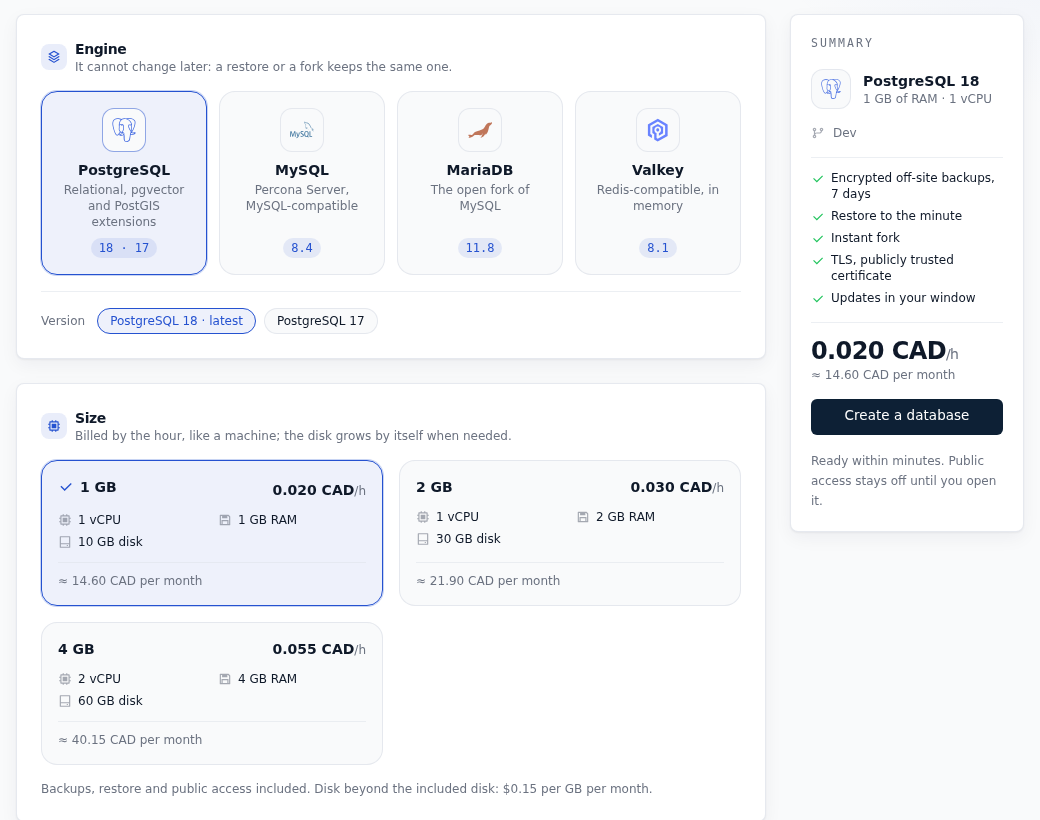
In the console, the Databases page asks for an engine, a size and a private network. The price shows per hour and per month before you confirm:
The same thing through the API, as in the demonstration:
curl -s -X POST https://api.ffxf.net/v1/databases \
     -H "Authorization: Bearer $FFXF_TOKEN" \
     -H "Idempotency-Key: $(uuidgen)" \
     -H "Content-Type: application/json" \
     -d '{"name": "shop", "vpc": 14, "engine": "postgresql", "size_gb": 1}'
The answer comes back at once, with the database being prepared:
{
  "id": 19,
  "name": "shop",
  "status": "pending",
  "engine": "postgresql",
  "version": "18",
  "size_gb": 1,
  "connection": {
    "host": "private-al7wfsqini.db.ffxf.cloud",
    "port": 5432,
    "database": "defaultdb",
    "username": "ffxfadmin",
    "ssl_mode": "verify-full"
  },
  "billing": {"mode": "hourly", "rate": "0.020", "currency": "CAD"}
}
What happened next, from the demonstration's log:
| Time | Step |
|---|---|
| 12:30:49 | Database ordered |
| 12:36:12 | First full backup done (3.6 MB) |
| 12:36:14 | Database active |
| 12:36:23 | First restore test, passed |
| 12:37:01 | Let's Encrypt certificate in place |
A little over five minutes for the database, its first backup and the test restore of that backup, then under a minute for the certificate.
3. Connect from the private network
The connection comes from a small Debian 13 VM on the same private network. The
connection string comes from the console or from
GET /v1/databases/19/credentials:
$ psql "postgresql://ffxfadmin:••••••••@private-al7wfsqini.db.ffxf.cloud:5432/defaultdb?sslmode=verify-full&sslrootcert=system" \
    -c 'SELECT version();' \
    -c 'SELECT ssl, version AS tls FROM pg_stat_ssl WHERE pid = pg_backend_pid();'
 PostgreSQL 18.6 (Debian 18.6-1.pgdg13+2) on x86_64-pc-linux-gnu, compiled by gcc (Debian 14.2.0-19) 14.2.0, 64-bit

 ssl |   tls
-----+---------
 t   | TLSv1.3
sslmode=verify-full checks that the certificate is valid and carries
the database's name; sslrootcert=system trusts the system's authorities
(libpq 16 or later). The certificate presented:
subject=CN=al7wfsqini.db.ffxf.cloud
issuer=C=US, O=Let's Encrypt, CN=YR2
Verify return code: 0 (ok)
MySQL and MariaDB work the same way with ssl-mode=VERIFY_IDENTITY,
Valkey with a rediss:// address.
4. A mistake, undone to the minute
The demonstration's application records 5,000 orders:
CREATE TABLE orders (
  id serial PRIMARY KEY,
  customer text NOT NULL,
  total numeric(10,2) NOT NULL,
  placed_at timestamptz NOT NULL DEFAULT now()
);
INSERT INTO orders (customer, total)
  SELECT 'customer-' || n, round((random() * 200)::numeric, 2) FROM generate_series(1, 5000) AS n;

 count |    sum
-------+-----------
  5000 | 499112.79      -- 12:37:57
A minute later, a query forgets its WHERE:
DELETE FROM orders;   -- 12:39:20
DELETE 5000
The Backups tab shows the restore window. It already covers the moment we want: 12:38, between the orders being recorded and the mistake.
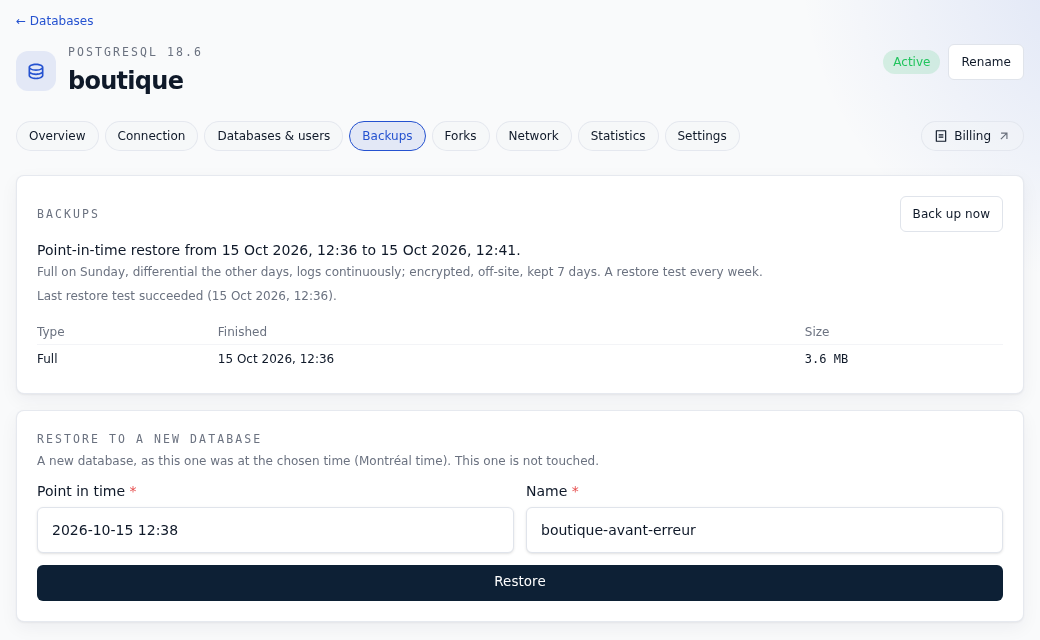
Through the API, the moment is given in UTC:
curl -s -X POST https://api.ffxf.net/v1/databases/19/restore \
     -H "Authorization: Bearer $FFXF_TOKEN" \
     -H "Idempotency-Key: $(uuidgen)" \
     -H "Content-Type: application/json" \
     -d '{"at": "2026-10-15T16:38:30Z", "name": "shop-before-mistake"}'
Requested at 12:40:36, the restored database was active at 12:46:58, with its certificate in place 23 seconds later. Most of those six minutes go into preparing the new VM; restoring the data itself took 12 seconds. Every order is back:
SELECT count(*), sum(total), max(placed_at) FROM orders;

 count |    sum    |              max
-------+-----------+-------------------------------
  5000 | 499112.79 | 2026-10-15 16:37:57.855193+00
The original database was not touched: it still holds 0 orders. You can look at what happened there before deleting it.
5. A fork for staging
A fork is a new database whose data is an instant copy of another one:
curl -s -X POST https://api.ffxf.net/v1/databases/20/forks \
     -H "Authorization: Bearer $FFXF_TOKEN" \
     -H "Idempotency-Key: $(uuidgen)" \
     -H "Content-Type: application/json" \
     -d '{"name": "shop-staging"}'
The data was copied less than 30 seconds after the request, and the fork was active at 12:53:28, once its VM had started. Same 5,000 orders; a change on the fork leaves the source alone:
-- on the fork
UPDATE orders SET total = 0 WHERE id <= 100;
UPDATE 100

-- on the source
SELECT count(*) FILTER (WHERE total = 0) AS zeroed, sum(total) FROM orders;
 zeroed |    sum
--------+-----------
      0 | 499112.79
A fork stays linked to its source for 7 days at most, with no backups of its own, then gets its own copy and its own backups.
6. Move to a larger size
The restored database becomes the new production; it moves to 2 GB, from the Settings tab or through the API:
curl -s -X POST https://api.ffxf.net/v1/databases/20/resize \
     -H "Authorization: Bearer $FFXF_TOKEN" \
     -H "Idempotency-Key: $(uuidgen)" \
     -H "Content-Type: application/json" \
     -d '{"size_gb": 2}'
Requested at 12:54:38. The engine stops cleanly, the VM restarts with its new resources (12:54:56), then the settings that depend on memory are recomputed. All along, a probe sent a query every two seconds from the client VM: the first answer after the cut came at 12:55:06, so under 30 seconds without a database. The engine restart that applies the new settings, afterwards, did not fail a single query.
                  before   after
shared_buffers    241MB    493MB
max_connections   25       50
orders            5000     5000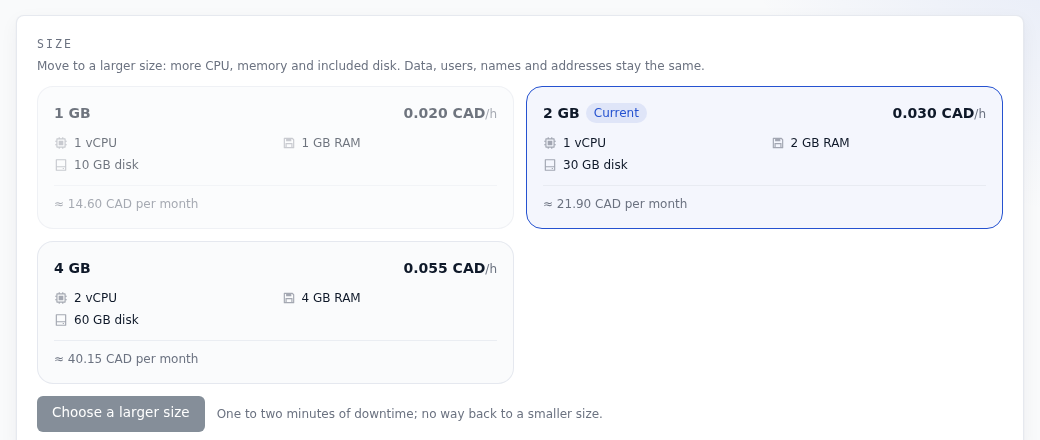
The included disk goes from 10 to 30 GB. The new rate, 0.030 CAD per hour, applies from the next hour, since the hour under way is already paid. There is no way back to a smaller size, because the disk does not shrink.
7. From an AI agent
The FFxF MCP server exposes the same actions:
create_database, get_database_credentials,
restore_database, fork_database,
resize_database. Its instructions tell the agent to state the price
before creating or growing a database, and to ask you before deleting one. Passwords only come out under the
databases.write scope: a monitoring key (vms.read) sees the
databases, not how to connect to them.
8. Pricing
| Size | vCPU | Included disk | Price |
|---|---|---|---|
| 1 GB | 1 | 10 GB | 0.020 CAD/h (≈ 14.60 CAD per month) |
| 2 GB | 1 | 30 GB | 0.030 CAD/h (≈ 21.90 CAD per month) |
| 4 GB | 2 | 60 GB | 0.055 CAD/h (≈ 40.15 CAD per month) |
Billed by the hour, from your credit, like a machine. Backups, restores, restore tests and public access are included; disk beyond what the size includes costs 0.15 CAD per GB per month. The whole demonstration (three databases and a small VM for under an hour) cost less than 10 cents.
Checklist
- The database on the same private network as the machines that use it.
sslmode=verify-full(orssl-mode=VERIFY_IDENTITY) in the application's connection string.- The password in an environment variable or a secret store, never in the repository.
- A maintenance window at a quiet hour for your application.
- A disk cap that leaves room.
- Before a risky migration: an on-demand backup, or a fork to try it first.
Engines, settings, public access and every API route are in the managed databases guide.